Your Creative Partner Since 1970 

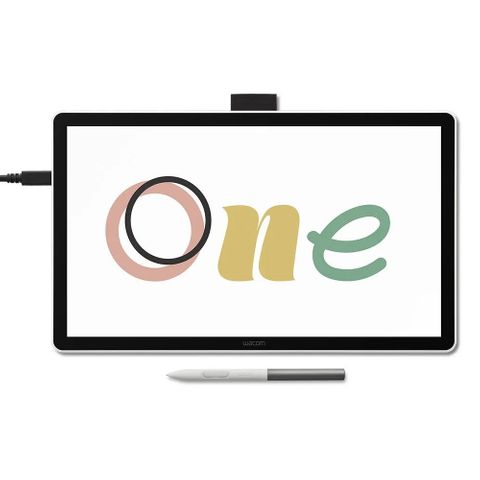
Wacom One 14 Pen Display
36.DTC141W0Z

Product Features:

12.2 x 6.9" Active Area
14" 1920 x 1080 IPS Display
4096 Levels of Pressure Sensitivity
1 x USB-C Port
98% sRGB Coverage
1000:1 Static Contrast Ratio
285 nits Brightness
178°/178° Viewing Angles
16 ms Response Rate
Includes Wacom One Standard Pen
$549.00
Stock Level:
Out of Stock
Check Location Availability

Wacom One 14 Pen Display

Essential Add-On's we recommend

Description

Designed for creative beginners, casual artists, and visual thinkers, the Wacom One 14" Creative Pen Displayprovides the canvas they need to make the transition from paper to digital. With a 14" Full HD anti-glare, anti-fingerprint screen and 98% sRGB color space coverage, you'll experience vibrant, true-to-life artwork with professional accuracy. The larger screen provides plenty of space to draw, sketch, annotate, or edit photos.

A Wacom One pen is included and delivers 4096 levels of pressure sensitivity. It is also battery-free so you don't have to worry about charging. Lightweight and easy to grip, this pen allow you to sketch lightly or apply bold strokes for consistent, responsive performance. Connect this pen display to your computer via USB-C.

Bigger Canvas, Better Detail

Redesigned with more drawing area, the laminated 14" Full HD IPS display offers a large 12.2 x 6.9" active area with 98% sRGB color accuracy and a paper-like texture that won't glare or smudge.
Wacom One Standard Pen
 
Supporting 4096 pressure levels and a 60° tilt, the included Wacom One Standard Pen makes it easy to draw thick and thin lines, lightly erase, and add shading. Two side buttons line the textured grip, which may be customized with frequently used functions such as zooming in and out. With electromagnetic resonance (EMR) technology, the pen doesn't require batteries or recharging, allowing you work without disruption.
 

Precise, Natural Feel

Draw with precision and accuracy. The included Wacom One pen captures everything from light lines to bold strokes with Wacom's responsive pressure sensitivity. The pen is battery-free so you don't ever have to charge.
 

Single Cable Connectivity

Wacom One connects to Windows, Mac, or Chromebook devices with a single USB-C cable that carries power, video, and pen data, keeping your workspace clean. To use this setup, your computer must have a USB-C port with Thunderbolt or DisplayPort Alt Mode. If your computer doesn't have one of these ports, you'll need to connect separate cables for power, video, and pen data, and then use the Wacom Converter (ACK45219Z) to merge them into a single USB-C connection to the display. To help reduce e-waste, Wacom includes the most commonly supported USB-C cable in the box, so most modern computers can connect right away without the need for extra adapters or cables.
 

Compatibility

Windows 10 or later
macOS 11 or later

You may also like...